

Boilerplate and Runbooks
Gruntwork Runbooks are interactive markdown documents that combine documentation with executable functionality, including code generation. Boilerplate is the template engine that powers Runbooks’ code generation.
This means that with minimal work, you can transform any of your boilerplate templates into an instant interactive web UI that generates customized code. Runbooks will honor your boilerplate variable types, validations, dependencies, and more.
Better yet, you can add documentation to your boilerplate template in standard markdown, run customizable commands, authenticate to services like AWS and GitHub, git clone a repo, compute boilerplate variables from custom scripts and more.
How It Works
Section titled “How It Works”A Runbook is an MDX file that can contain special blocks like <Template>, <Inputs>, and <TemplateInline>. These blocks reference Boilerplate templates (directories with a boilerplate.yml), and Runbooks automatically generates web forms from the variable definitions.
Here’s the flow:
- You write a
boilerplate.ymlwith variables, just like any Boilerplate template - You reference that template from a Runbook MDX file using a
<Template>block - Runbooks reads the
boilerplate.ymland auto-generates a web form - The user fills in the form, and Boilerplate renders the output files
Example
Section titled “Example”The Boilerplate template
Section titled “The Boilerplate template”A standard Boilerplate template with variables and template files:
variables:  - name: Environment    type: enum    description: Target environment for deployment    options:      - non-prod      - prod    default: non-prod
  - name: AwsRegion    type: enum    description: The AWS region to deploy the Lambda function to    options:      - us-east-1      - us-west-2      - eu-west-1    default: "us-west-2"    validations: "required"
  - name: FunctionName    type: string    description: Name for your Lambda function    default: example-lambda    validations: "required"
  - name: Runtime    type: enum    description: Lambda runtime environment    options:      - python3.13      - python3.12      - nodejs22.x      - nodejs20.x    default: python3.13
The Runbook
Section titled “The Runbook”The Runbook MDX file references the template with a <Template> block:
## Configure the Lambda function
First, let's configure the Lambda function itself. This is boilerplate codethat will run "Hello, World!" when the Lambda function is invoked.
<Template id="lambda-setup" path="templates/lambda-unit" />
The result
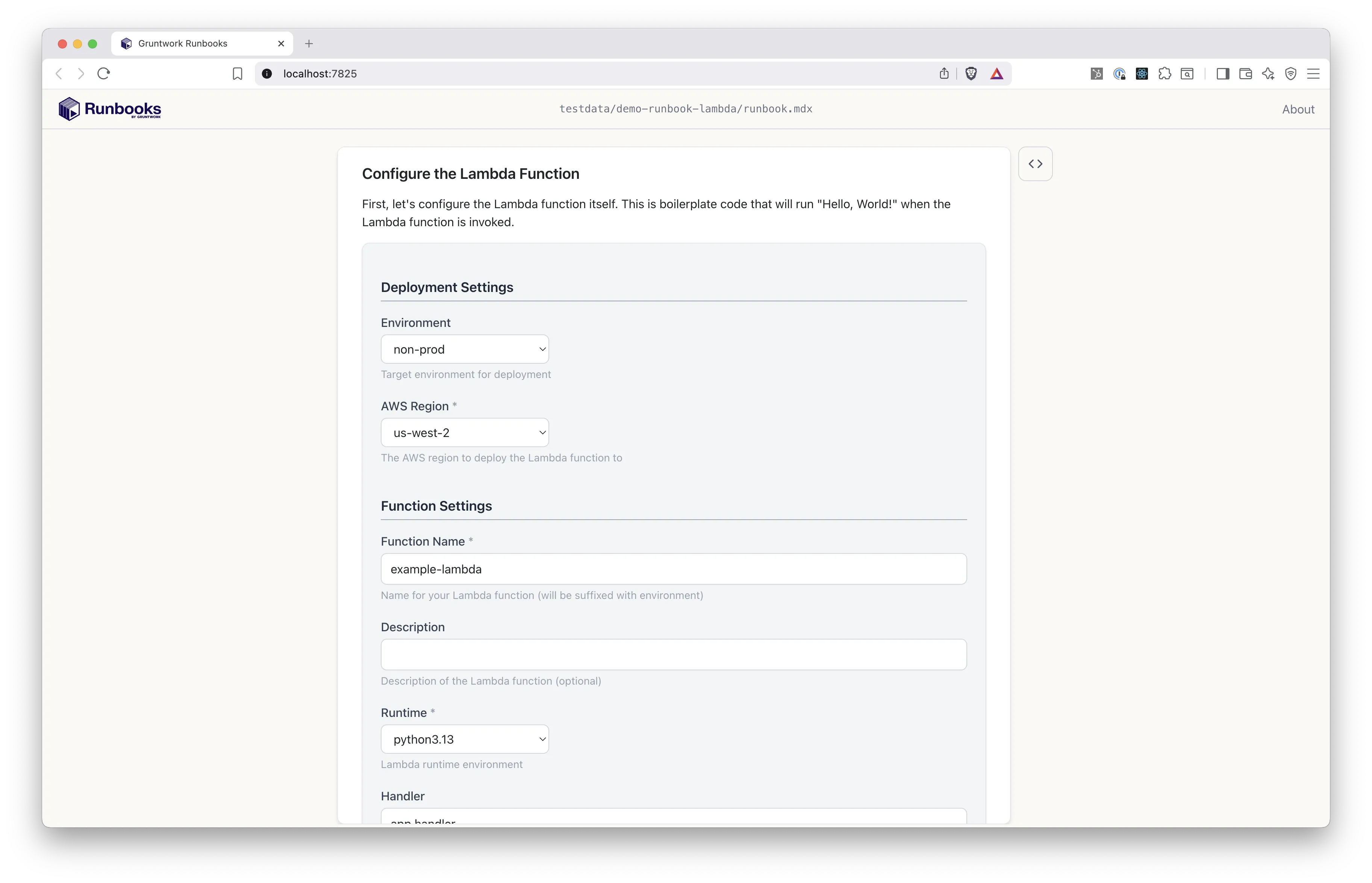
Section titled “The result”Runbooks reads the boilerplate.yml and renders an interactive form. Each variable becomes a form field matching its type — text inputs for strings, dropdowns for enums, checkboxes for booleans:
As the user fills in the form, a live preview shows exactly how their inputs affect the generated code:
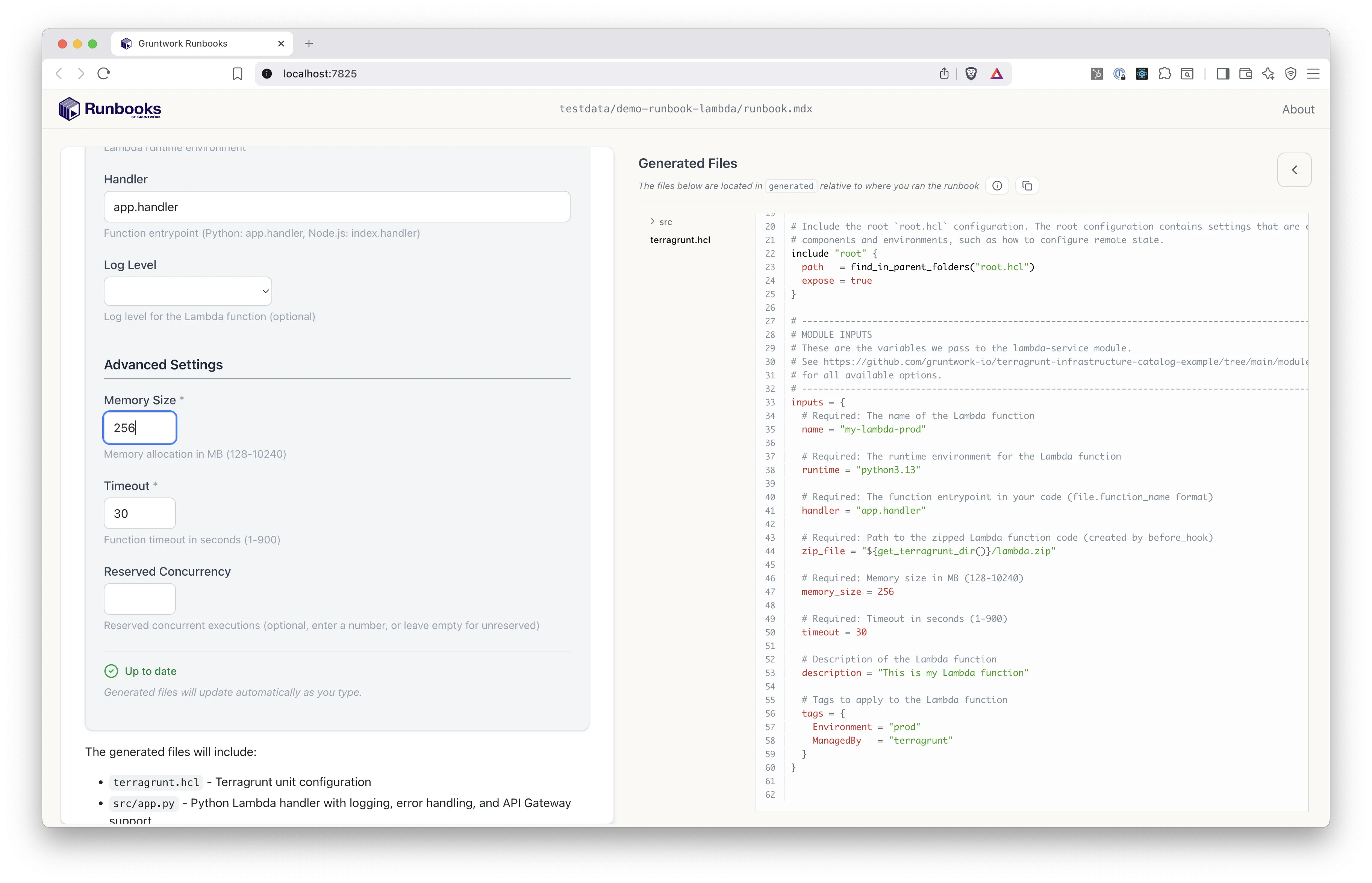
When the user clicks Generate, Boilerplate processes the template files and writes the rendered output to the workspace.
Runbooks-Specific Extensions
Section titled “Runbooks-Specific Extensions”Runbooks adds a few YAML extensions (prefixed with x-) to the standard boilerplate.yml format:
| Extension | Purpose |
|---|---|
x-section | Groups related variables under named collapsible headings in the form UI |
x-schema | Defines structured field schemas for map type variables |
x-schema-instance-label | Custom label for each entry in a schema-based map |
variables:  - name: FunctionName    type: string    description: Name for your Lambda function    x-section: Function Settings
  - name: AwsRegion    type: enum    description: AWS region    x-section: Deployment Settings
  - name: Tags    type: map    description: Resource tags    x-section: Advanced    x-schema:      Name: string      Environment: string    x-schema-instance-label: Tag Name
Block Types
Section titled “Block Types”Runbooks provides several block types that use Boilerplate:
- Template
- Inputs
- TemplateInline
- Sharing variables between blocks
For details, see the authoring section in the Runbooks documentation.
In general, everything you know about Boilerplate such as variables, types, validations, dependencies, Go template syntax, and helper functions all works in Runbooks. The Runbook UI is effectively a visual layer on top of the same Boilerplate engine.